How it works
How Drift works
A small tracker in your car's OBD port and the Drift web app on your phone. Plug in, follow the guided setup, and see your car live. Most people finish in about ten minutes.
Step 1
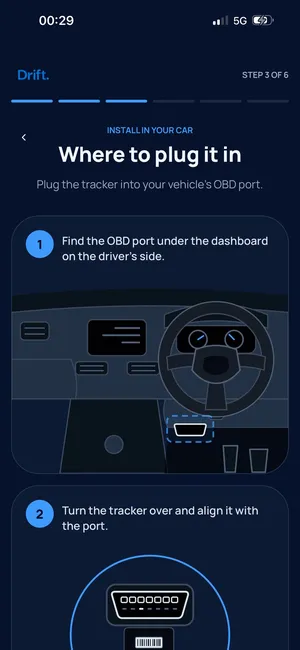
Plug the tracker into the OBD port
The OBD port is usually under the dashboard on the driver's side. The setup screens show you where to look and how to line the tracker up with the port.
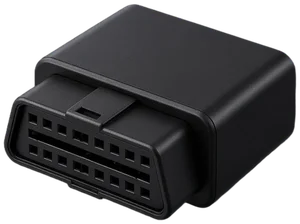
The tracker draws power from the car, so there is no battery pack to charge. A small built-in backup battery keeps it reporting for a while if power is cut. Hide it somewhere sensible and out of casual sight.
Step 2
Open the Drift web app
Go to live.driftgps.app in your phone's browser. There is nothing to download, and you can add it to your home screen if you like.
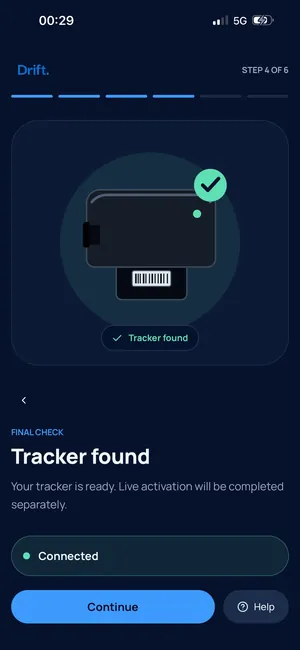
The guided setup takes you through your account, connecting the tracker, adding your car and choosing your alerts. It tells you when the tracker is found. Most people finish in about ten minutes.
Step 3
See your car live
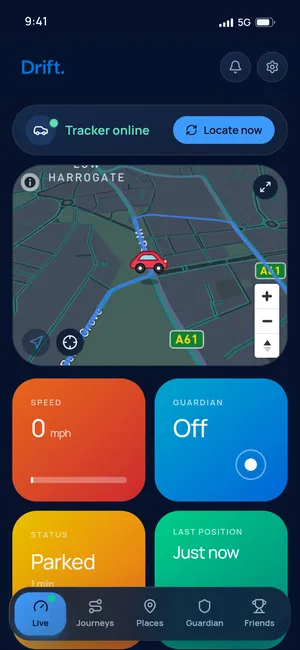
The Live screen shows your car on a map with its current speed, status and last position. Tap Locate now to ask the tracker for a fresh position.
From the same screen you can arm Guardian when you park, so Drift sends an urgent alert if the parked car moves or goes quiet.
Step 4
Get alerts and look back at journeys
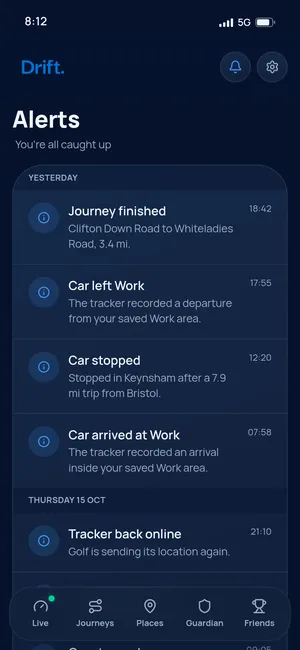
Choose the alerts you want: speed alerts when your threshold is crossed, place alerts when the car arrives at or leaves a place you have saved, such as home or work, and tracker health if the tracker stops responding. Quiet hours pause non-urgent alerts overnight.
Every trip is saved in Journeys with its route and miles, so you can look back at where the car has been.
Frequently asked questions
Do I need to download an app?
No. Drift runs in your phone's browser at live.driftgps.app. You can add it to your home screen so it opens like an app.
How long does setup take?
Most people finish in about ten minutes. The app guides you step by step: account, plug-in location, connect, add your car and choose alerts.
Does the tracker need charging?
No. It is powered by your car's OBD port, so there is no daily charging. A small built-in backup battery keeps it reporting for a while if power is cut.
What alerts can Drift send?
Speed alerts when your threshold is crossed, place alerts when the car arrives at or leaves a saved place, tracker health alerts if the tracker stops responding, and Guardian alerts if the parked car moves or goes quiet while Guardian is on. Quiet hours pause non-urgent alerts overnight.
Do I need a membership?
Yes. Drift membership covers the mobile data the tracker uses and the app features. You can pay monthly with no lock-in, or yearly.
Drift
Car Tracking. For Everyone.
Get the Drift tracker and membership, plug it in and follow the guided setup in the app.
Buy Drift